
I automated a document approval workflow this year. Intake, drafting, routing, signature, dispatch, all of it runs on its own now. One step still stops for a person before anything goes out. That was not a compromise I made because the tooling could not go further. It was the whole point of building it that way.
Here is what that build taught me about where automation should stop, and why the stopping point matters more than how fast everything else runs.
Contents
- What I automated, and the one step I did not
- The two jobs a human gate actually does
- The time the gate earned its keep
- Why full automation is tempting, and where it breaks
- How to design a gate that does not kill the speed you built
- Does the platform matter here?
What I automated, and the one step I did not
The workflow takes a request, generates a formal document from it, and gets that document signed and delivered. I built it on Zoho Creator to capture and structure the intake data, Zoho Writer to merge that data into a document template, and Zoho Sign to handle the final signature and delivery. If you are not on Zoho, the same shape works with n8n or Zapier gluing a form, a document generator, and an e-signature tool together. The platform is not the interesting part. The shape is: capture, draft, check, sign, send.
Every step in that chain runs without me now, except one. Before a generated draft is allowed to move to signature, a person reads it against the actual request and either approves it or stops it. That is the only manual step left in the whole pipeline.
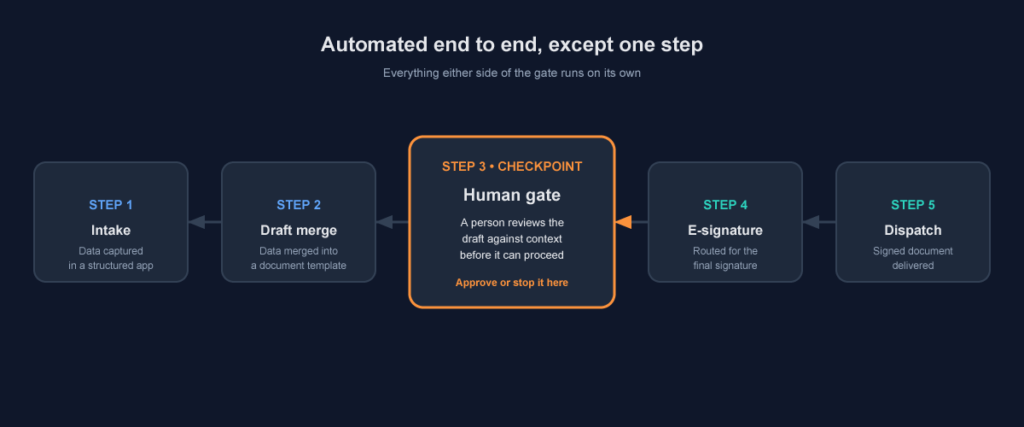
The workflow runs itself end to end, apart from one deliberate checkpoint before signature.
The two jobs a human gate actually does
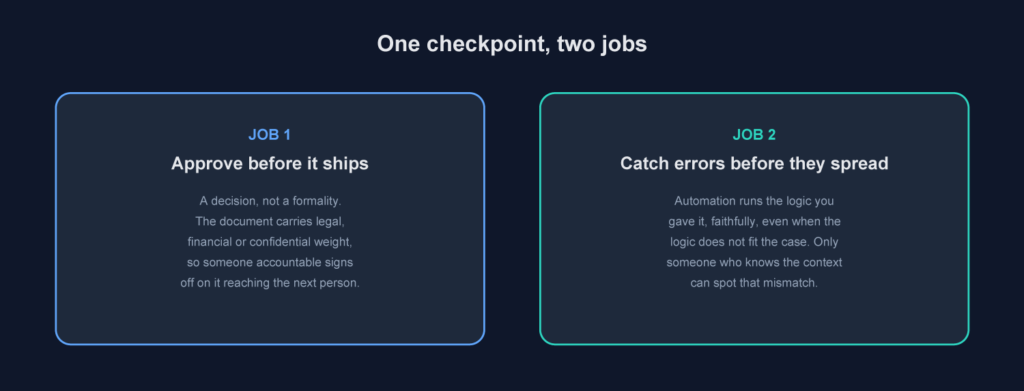
It is easy to think of a human gate as one thing: a person clicking approve. On a workflow like this, it is doing two separate jobs, and both matter.
The first is a decision. The document carries legal, financial, or confidential weight, so someone accountable has to sign off before it reaches the next person, usually before it goes up for a final signature from management. That is not a rubber stamp. It is someone taking responsibility for what is about to leave the building.
The second is error detection. Automation executes the logic you gave it, faithfully, every time, even in the one case where that logic does not actually fit. It cannot tell the difference between a rule applied correctly and a rule applied to the wrong situation. A person who understands the context can.
The time the gate earned its keep
The clearest justification for keeping this step was not theoretical. On one run, the automation produced a value that was technically correct given the rule it was following. The rule itself was the problem: the condition it applied did not match the specific case in front of it. Nothing failed. No error was thrown. The document generated cleanly and would have gone straight to management for the final signature if the gate had not been there.
I cannot share the specifics, the document was confidential, but the shape of the mistake is the useful part. It was not a calculation error. It was a business rule that was right in general and wrong in that one case. That is exactly the kind of mistake automation cannot catch on its own, because from the system's point of view, it did nothing wrong.
Why full automation is tempting, and where it breaks
Once you have automated four steps out of five, the fifth one looks like the last piece of friction left. Straight-through processing is a satisfying goal, and every manual step shows up as a delay on a dashboard, so it is the first thing anyone suggests cutting.
That instinct is fine for low-stakes output. An internal status update or a routine notification does not need a human between the trigger and the send. A document with legal, financial, or confidential weight is a different category. A wrong figure in a marketing email gets corrected in a follow-up. A wrong clause or wrong value in a signed document does not get quietly fixed. The cost of one mistake reaching the wrong desk is not symmetrical with the time saved by removing the check.
How to design a gate that does not kill the speed you built
The objection to all this is obvious: does not a manual step just reintroduce the bottleneck you were trying to remove? Not if you scope it properly.
Keep the gate narrow. The person reviewing should be checking the one or two things most likely to be wrong, not re-reading the entire document from scratch. Give them a short, specific checklist tied to the fields the automation actually fills in, not a generic proofread. Put a time expectation around the review so it stays a checkpoint and not a queue. This is the same logic I apply to paid media: I hold a campaign for one human check before launch, on the specific settings most likely to be wrong, not a full re-approval of every asset every time.
Does the platform matter here?
Not much. Zoho Creator, Zoho Writer, and Zoho Sign happened to be the right combination for me because I needed a structured data source, a document generator that could merge into a template, and native e-signature in one ecosystem. If your stack is different, n8n or Zapier will do the same connecting job between whichever form tool, document generator, and e-signature tool you already use.
The tool choice is an implementation detail. The decision that actually matters is where in that chain you force a pause, and who you make responsible for it.
What actually happens on real workflows
On every automated document workflow I have built, the human step is the first thing someone asks to cut, because it is the only part of the process that shows up as a wait time instead of a green tick. I have learned to push back on that by asking a different question: if this exact document went out wrong, who deals with the fallout, and how long does that take compared to the thirty seconds the check adds? Framed that way, the gate almost always stays.
FAQ
Does a human-in-the-loop step slow down automation?
It adds minutes, not days, if you scope the review to one specific decision. A narrow, well-defined check on a fast workflow is not the same bottleneck as a full manual process.
Should every automated workflow have a human gate?
No. Add one where the output carries legal, financial, or confidential weight, or where a mistake is expensive to reverse. Low-stakes, high-volume output does not need it.
What is the difference between human-in-the-loop and human-on-the-loop?
In-the-loop means a person approves before the output ships. On-the-loop means the output ships automatically and a person only intervenes when something looks wrong afterwards. Document approval workflows with real consequences usually need in-the-loop.
Can AI review its own output instead of a person?
It can flag anomalies and missing fields well. It cannot reliably judge whether a correctly applied rule fits an unusual real-world case, because that judgement depends on context the system was never given.
The takeaway
Automating a workflow does not mean removing every human decision from it. It means removing the repetitive ones and keeping the one that actually needs judgement. If you are building or auditing a document workflow and want a second opinion on where that checkpoint should sit, get in touch.